
Getting started
Introduction
This documentation will help you integrate the Finik payment system into your application so that your clients can easily pay for your services using any financial application in Kyrgyzstan.
You will primarily be working with Finik Web SDK — the payment provider for your application.
Integrating with Finik Web SDK consists of the following steps:
- Generate an RSA key pair — private and public. They are needed for the first step of authorization.
- Obtain a corporate account:
- Entrepreneurs — create an account in the Finik mobile app (instructions).
- Organizations — obtain an account from Finik representatives.
- Create an API key of type WEB in your Finik personal account by uploading your public key (instructions).
- Set up request signing — the second step of authorization: every request is signed with your private key.
- Create payments — send signed requests to Finik Web SDK and receive a payment link.
- Handle webhooks — receive payment status notifications and verify their signature.
Each step is explained in detail below.
Account setup
- Download the Finik app
Register and go through online identification right in the application. If you are a foreign citizen, we will help you with offline identification in our office.
- Generate keys
Generate private and public RSA keys — they are required for authorization in Finik Web SDK. See the «Key generation» section of this documentation.
- Generate API keys in your personal account
- Log in to your personal account
- Open the “Keys” section in the left menu
- Click “Generate key” and fill in the form:
- User — select yourself
- Client name — your legal name and brand, e.g.
IP Asan Asanov (Mancho) - Client type — select Web client
- Public key — upload your
finik_public.pemfile generated in step 2 - QuickPay key, QuickPay ID, Callback URL — optional fields, leave blank
- Click ”Create” — your keys will appear in the “Keys” section
- Implement technical integration
Follow the steps below - signing requests, creating payment, processing webhook.
How it works
Complete payment flow from start to confirmation.
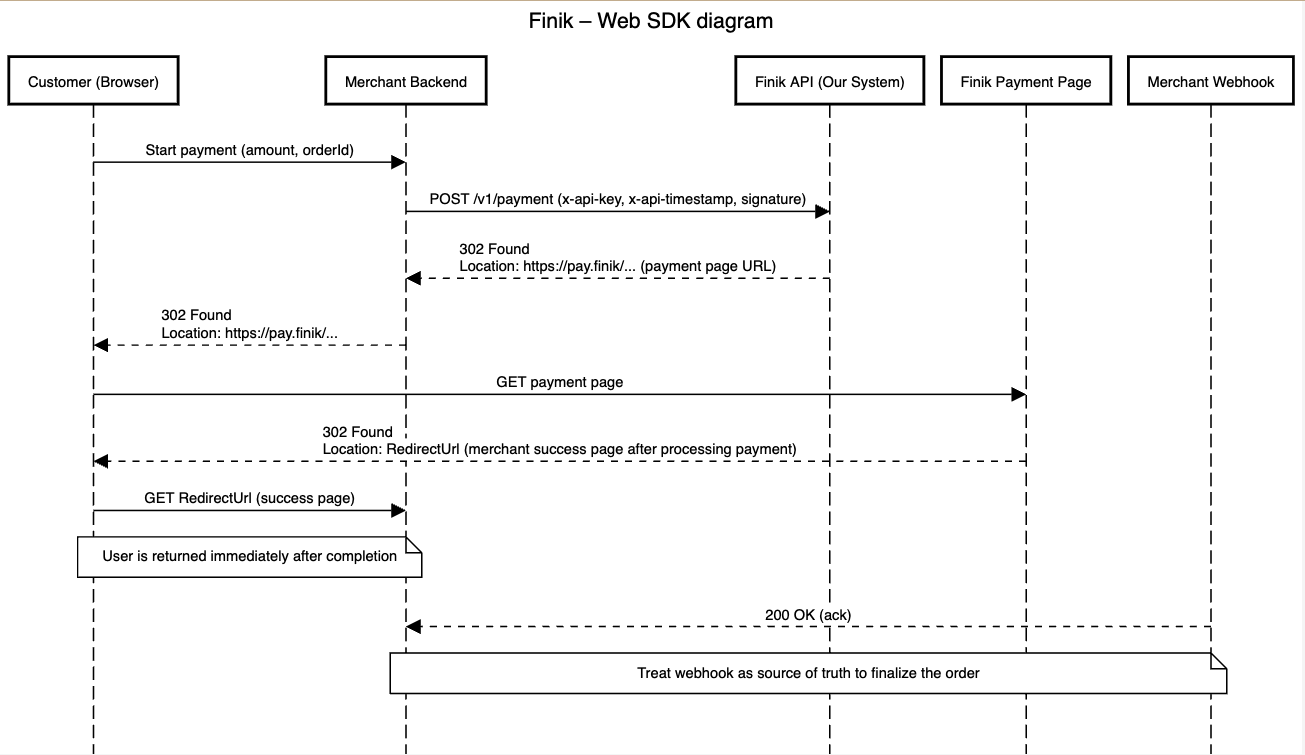
Check out the payment flow demo in practice.