
Getting started
API for paying services and sending transfers on behalf of a partner (agent payments).
How it works
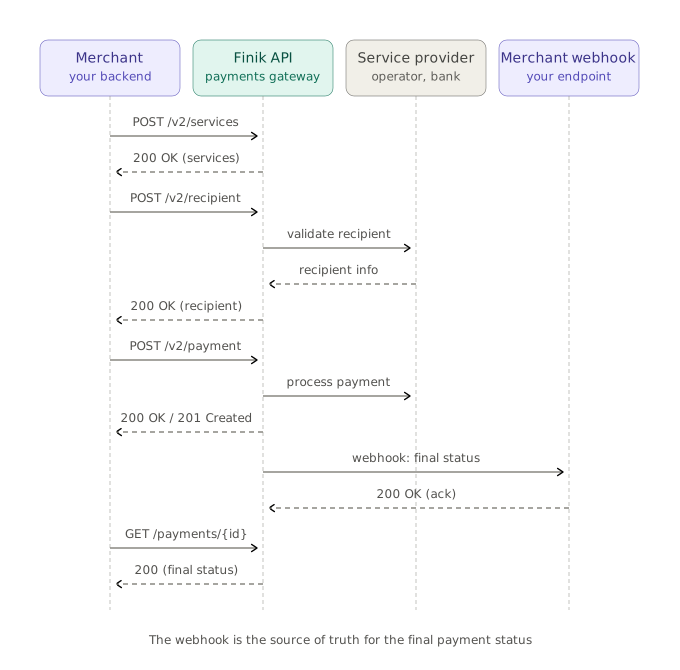
The full outgoing-payment flow from start to confirmation:
- You request the list of services and learn their required fields (
requiredFields). - You verify the recipient — Finik returns their name.
- You create a payment from your account with a unique
transactionId. - Finik debits the funds and sends the payment to the service provider.
- You receive a webhook with the final status (
SUCCEEDEDorFAILED) or check the status viaGET /v2/payments/{paymentId}.
Introduction
This documentation will help you integrate the Finik Payments Gateway API into your application so that you can make payments on your own behalf: pay for mobile, internet, utilities and other services, and send transfers to Finik users — directly from your corporate account to hundreds of service providers in Kyrgyzstan.
The integration consists of the following steps:
- Generate an RSA key pair — private and public. They are needed to authorize your requests.
- Get an API key — send your public key to Finik representatives and receive an
ApiKeyto work with the API. - Set up request signing — every request is signed with your private key.
- Get the list of services — request the catalog of available services and their required fields via
POST /v2/services. - Verify the recipient — before a payment, make sure the recipient exists via
POST /v2/recipient. - Create payments — send signed requests to
POST /v2/paymentand track the status. - Handle the webhook — receive notifications about the final payment status and verify their signature.
Quick start
- Get your
ApiKeyfrom Finik representatives. - Generate an RSA key pair:
openssl genrsa -out finik_private.pem 2048
openssl rsa -in finik_private.pem -pubout > finik_public.pem- Send the public key (
finik_public.pem) to Finik representatives. Keep the private key secret — whoever gets it can send requests on your behalf. - Add a signing library:
- Node.js —
@mancho.devs/authorizer(NPM) - Python —
mancho-devs/python-authorizer - Other languages — see the signing algorithm
- Node.js —
- Make your first request in the beta environment — start with
POST /v2/services.
Environments
| Environment | Base URL | Finik public key for verifying webhooks |
|---|---|---|
Beta | https://beta.api.paymentsgateway.averspay.kg | Beta public key (see the “Webhook and error codes” page) |
Production | https://api.paymentsgateway.averspay.kg | Prod public key (see the “Webhook and error codes” page) |
Authentication
Every request is signed with your private key. The signature is sent in HTTP headers:
| Header | Type | Required | Description |
|---|---|---|---|
signature | String | Required | Request signature (Base64). |
x-api-key | String | Required | Your API key issued by Finik. Used in signature generation. |
x-api-timestamp | String | Required | Current time in milliseconds. Used in signature generation. |
Building the string to sign
data  = lowercase(HTTP method) + "\n"         // "post" or "get"
data += URI path + "\n"                        // e.g. "/v2/payment"
data += headers + "\n"                         // see the rules below
data += query parameters + "\n"                // if there are no query params, DON'T add this "\n"
data += JSON of the request body               // keys sorted, see below
Rules for headers:
- Take
Hostand all headers that start withx-api-*. - Sort by header name alphabetically.
- Join with
&in thename:valueformat (names in lowercase):
host:api.paymentsgateway.averspay.kg&x-api-key:YOUR_KEY&x-api-timestamp:1719900000000Rules for query parameters:
- Sort by parameter name alphabetically.
- Join with
&in theURiEncode(name)=URiEncode(value)format. - If a parameter has no value (e.g.
?acl) — use an empty string:acl=.
Rules for the request body:
The body is serialized to JSON with keys sorted alphabetically.
Signing
The assembled data string is signed with the SHA256withRSA algorithm using your private key, the result is encoded in Base64 and sent in the signature header.
Example in Java:
public String sign(String payload, String privatePath) {
  try {
    Signature signature = Signature.getInstance("SHA256withRSA");
    String privateKeyFile = new String(Files.readAllBytes(Paths.get(privatePath)));
    RSAKey rsaKey = (RSAKey) JWK.parseFromPEMEncodedObjects(privateKeyFile);
    PrivateKey privateKey = rsaKey.toPrivateKey();
    signature.initSign(privateKey);
    signature.update(payload.getBytes(StandardCharsets.UTF_8));
    return Base64.encodeBase64String(signature.sign());
  } catch (Exception e) {
    throw new AppException(e.getMessage());
  }
}
Ready-made libraries
| Language | Package |
|---|---|
Node.js | @mancho.devs/authorizer (NPM) |
Python | mancho-devs/python-authorizer |
Other | Implement the algorithm above. Libraries for other languages are planned. |